Manage Subscription
In GetWardrobe, you can check your current Premium status, expiration date, and auto-renewal status. To change or cancel your subscription, use the platform where you purchased it.
How to check your subscription status
You can check your subscription details directly in GetWardrobe. Tap your avatar in the upper-left corner of the main screen → Premium.
If you have a subscription, the Subscription screen shows:
- your current subscription status;
- the auto-renewal status;
- the platform where you purchased your subscription;
- how much time is left;
- the expiration date;
- the billing period.
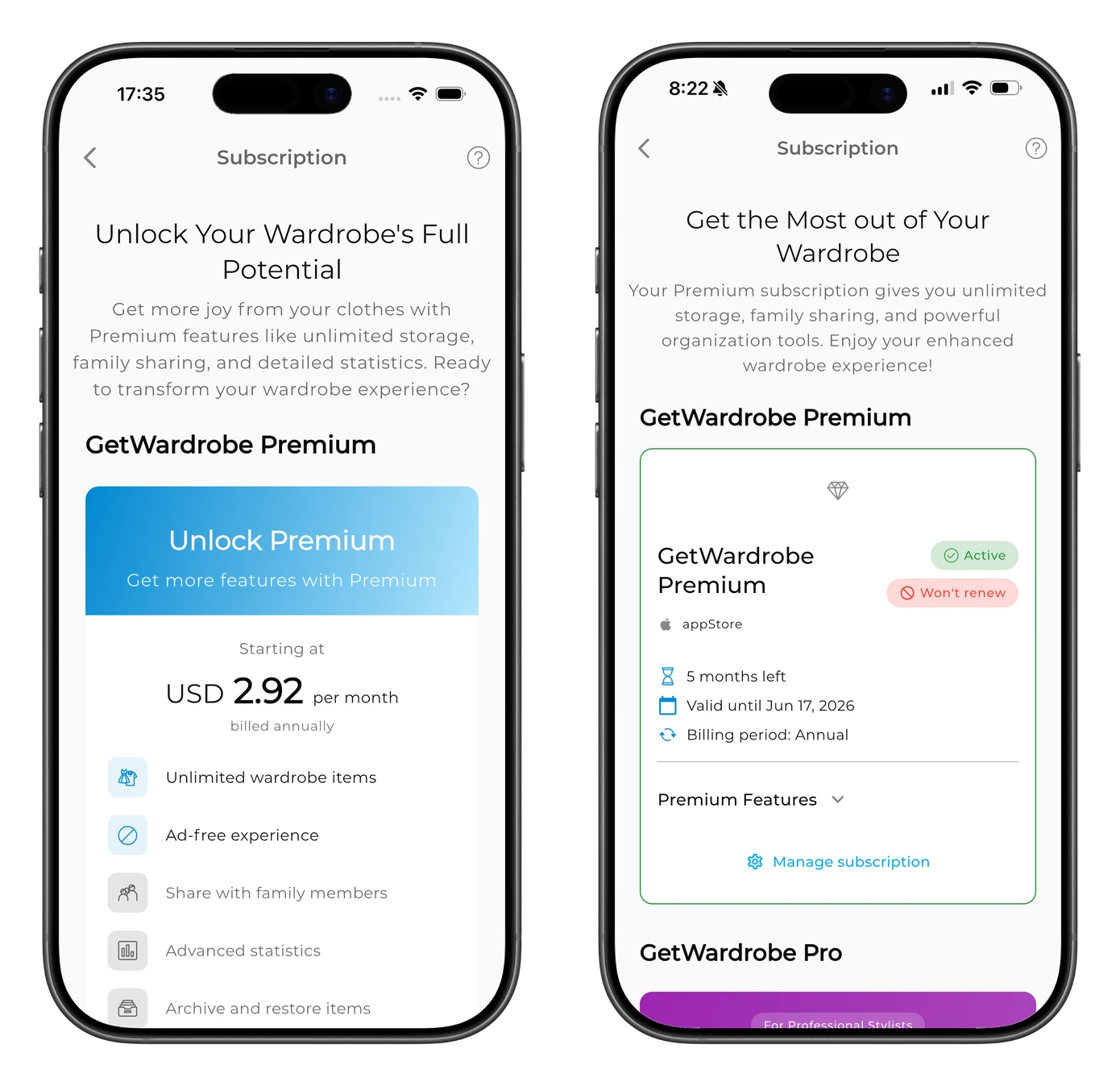
For example:
- Active — Premium is currently active;
- Won't renew — auto-renewal is turned off, and the subscription will end on the date shown.
If the Manage subscription option is available, you can use it to go to your subscription settings.
If you don't have an active subscription, you'll see an offer to get GetWardrobe Premium instead of subscription details.
How to cancel your subscription
Subscriptions are canceled through the platform where they were purchased.
If you can't find your subscription or aren't sure which platform it was purchased through, email us at support@getwardrobe.com — we'll help you check its status and where it is managed.
App Store
If you subscribed through the App Store:
- Open Settings on your iPhone or iPad.
- Tap your name.
- Select Subscriptions.
- Open GetWardrobe.
- Tap Cancel Subscription.
Google Play
If you subscribed through Google Play:
- Open Google Play.
- Tap the profile icon.
- Select Payments & subscriptions → Subscriptions.
- Open GetWardrobe.
- Tap Cancel subscription.
If PayPal is your payment method in Google Play, you still need to cancel the subscription through Google Play.
GetWardrobe web version
If you purchased your subscription through the GetWardrobe web version, manage it in the web version.
If App Store or Google Play payment isn't available
If payments through the App Store or Google Play aren't available on your device, you can subscribe to Premium through the GetWardrobe web version. See How to Pay for a Subscription When In-App Payment Isn't Available for step-by-step instructions.
What happens after you cancel
After you cancel, Premium remains available until the expiration date shown in your subscription.
Auto-renewal is turned off, so Premium won't renew automatically and you won't be charged for the next billing period. In GetWardrobe, an active subscription with auto-renewal turned off may show the status Won't renew.
After Premium expires, your account switches to the free version. If the number of items and outfits is above the free plan limit, they will remain in your account, but you won't be able to add new items or outfits or edit existing ones until the number is within the free plan limit again or you reactivate Premium.
Canceling Premium does not delete your wardrobe data. Your items, outfits, and other data remain in your account unless you delete your account.
Refunds
If you purchased your subscription through the App Store or Google Play, the purchase is processed by that platform. Refund requests should therefore be submitted through the platform where you purchased the subscription.
- App Store: request a refund directly from Apple at reportaproblem.apple.com. See Apple's refund guide for details.
- Google Play: request a refund through Google Play. Refund eligibility may depend on when the charge was made and the circumstances of the purchase.
- Web version: if you purchased your subscription through the GetWardrobe web version, email us at support@getwardrobe.com.
For App Store and Google Play purchases, Apple or Google makes the final decision on refund requests.
FAQ
I don't see GetWardrobe in my App Store or Google Play subscriptions. What should I do?
First, make sure you're signed in to the same App Store or Google Play account you used to purchase the subscription. You can also open GetWardrobe → avatar → Premium to see which platform is listed in your subscription details. If GetWardrobe still doesn't appear, or you can't determine where the subscription was purchased, email us at support@getwardrobe.com — we'll help you figure it out.
How do I know my subscription has been canceled?
Open GetWardrobe → avatar → Premium. If Premium is still active but auto-renewal has been turned off, the Subscription screen will show the expiration date and an auto-renewal status such as Won't renew.
Will my subscription be canceled if I delete my account?
No. Deleting your GetWardrobe account does not cancel an active subscription. Cancel your subscription separately through the platform where you purchased it. Deleting your account and canceling your subscription are two separate actions. Learn more in Delete Account.
Will I lose my items and outfits after canceling Premium?
No. Canceling Premium does not delete your wardrobe data. Your items, outfits, and other data remain in your account.
How do I access Premium on a new device?
Sign in to GetWardrobe on the new device using the same account. Your wardrobe data will sync with your account. If Premium doesn't appear after you sign in, email us at support@getwardrobe.com — we'll help you check your subscription.
Need help?
Contact us at support@getwardrobe.com