Gestionar la suscripción
En GetWardrobe puedes comprobar el estado actual de Premium, la fecha de finalización y el estado de la renovación automática. Puedes cambiar o cancelar tu suscripción en la plataforma donde la contrataste.
Cómo comprobar el estado de tu suscripción
Puedes consultar los datos de tu suscripción directamente en GetWardrobe. Toca tu avatar en la esquina superior izquierda de la pantalla principal → Premium.
Si tienes una suscripción, la pantalla Suscripción muestra:
- el estado actual de tu suscripción;
- el estado de la renovación automática;
- la plataforma donde contrataste tu suscripción;
- cuánto tiempo queda;
- la fecha de finalización;
- el periodo de facturación.
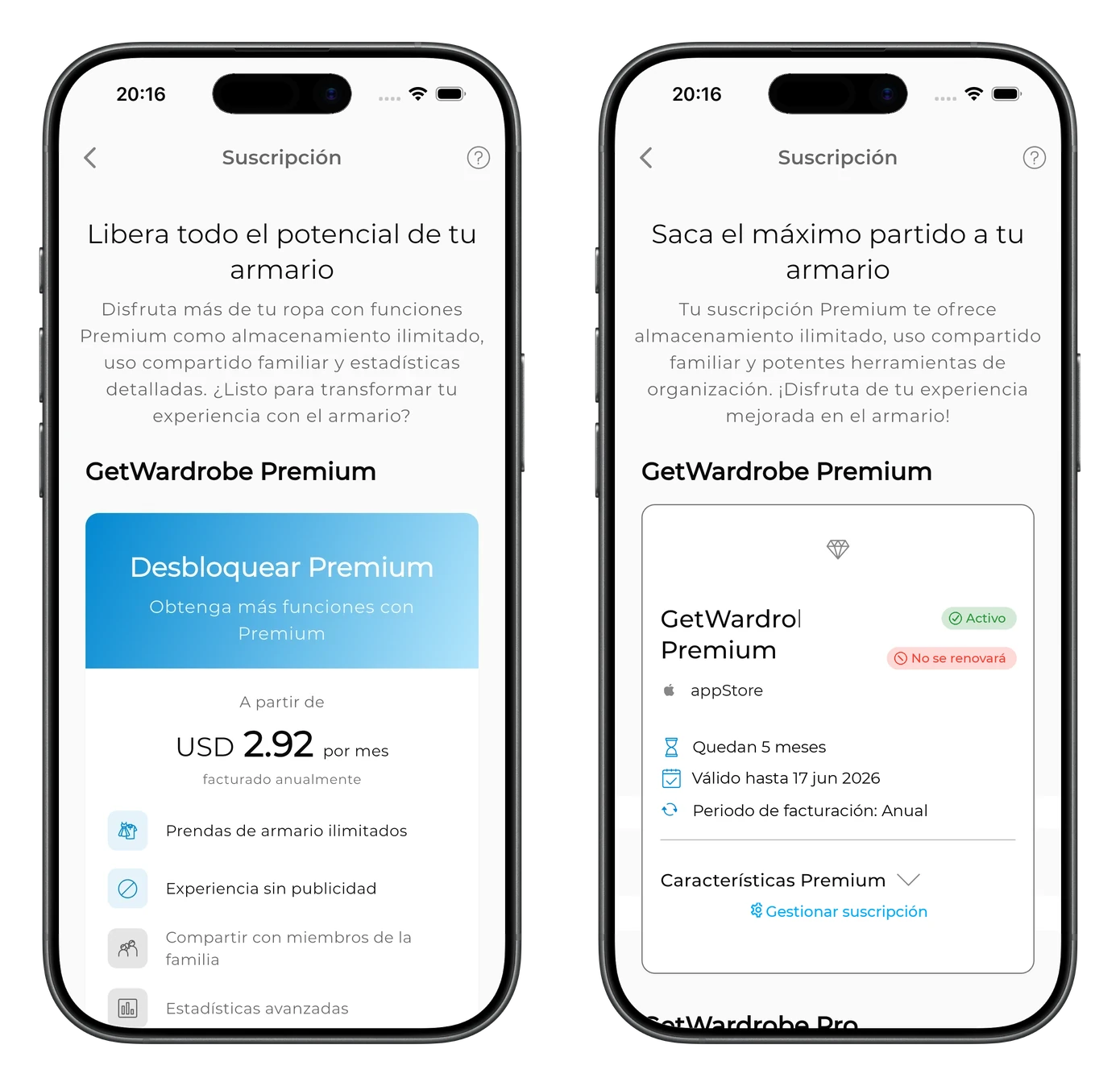
Por ejemplo:
- Activo — Premium está activo;
- No se renovará — la renovación automática está desactivada y la suscripción finalizará en la fecha indicada.
Si está disponible la opción Gestionar suscripción, puedes usarla para ir a los ajustes de tu suscripción.
Si no tienes una suscripción activa, en lugar de los datos de la suscripción verás una oferta para contratar GetWardrobe Premium.
Cómo cancelar tu suscripción
Las suscripciones se cancelan en la plataforma donde se contrataron.
Si no encuentras tu suscripción o no sabes a través de qué plataforma la contrataste, escríbenos a support@getwardrobe.com y te ayudaremos a comprobar su estado y dónde se gestiona.
App Store
Si te suscribiste a través de la App Store:
- Abre Ajustes en tu iPhone o iPad.
- Toca tu nombre.
- Selecciona Suscripciones.
- Abre GetWardrobe.
- Toca Cancelar suscripción.
Google Play
Si te suscribiste a través de Google Play:
- Abre Google Play.
- Toca el icono de perfil.
- Selecciona Pagos y suscripciones → Suscripciones.
- Abre GetWardrobe.
- Toca Cancelar suscripción.
Si utilizas PayPal como método de pago en Google Play, debes cancelar la suscripción en Google Play.
Versión web de GetWardrobe
Si te suscribiste a través de la versión web de GetWardrobe, gestiónala en la versión web.
Si el pago desde la App Store o Google Play no está disponible
Si los pagos a través de la App Store o Google Play no están disponibles en tu dispositivo, puedes suscribirte a Premium a través de la versión web de GetWardrobe. Consulta Cómo pagar la suscripción si el pago desde la app no está disponible para ver el proceso completo.
Qué pasa después de cancelar
Después de cancelar, Premium seguirá disponible hasta la fecha de finalización indicada en tu suscripción.
La renovación automática se desactivará, por lo que Premium no se renovará automáticamente y no se te cobrará el siguiente periodo de facturación. En GetWardrobe, una suscripción activa con la renovación automática desactivada puede mostrar el estado No se renovará.
Cuando Premium caduque, tu cuenta pasará a la versión gratuita. Si el número de prendas y outfits supera el límite del plan gratuito, permanecerán en tu cuenta, pero no podrás añadir nuevas prendas u outfits ni editar los existentes hasta que el número esté de nuevo dentro del límite del plan gratuito o vuelvas a activar Premium.
Cancelar Premium no borra los datos de tu armario. Tus prendas, tus outfits y los demás datos permanecen en tu cuenta a menos que elimines la cuenta.
Reembolsos
Si compraste tu suscripción a través de la App Store o Google Play, la compra se procesa a través de esa plataforma. Por eso, las solicitudes de reembolso deben enviarse a través de la plataforma donde compraste la suscripción.
- App Store: solicita el reembolso directamente a Apple en reportaproblem.apple.com. Más información en la guía de Apple.
- Google Play: solicita el reembolso a través de Google Play. La posibilidad de obtener un reembolso puede depender de la fecha del cargo y de las circunstancias de la compra.
- Versión web: si te suscribiste a través de la versión web de GetWardrobe, escríbenos a support@getwardrobe.com.
En las compras de la App Store y Google Play, la decisión final sobre el reembolso la toma Apple o Google.
Preguntas frecuentes
No veo GetWardrobe en mis suscripciones de la App Store o Google Play. ¿Qué hago?
Primero, comprueba que has iniciado sesión con la misma cuenta de la App Store o de Google Play que usaste para suscribirte. También puedes abrir GetWardrobe → avatar → Premium para ver qué plataforma aparece en los datos de tu suscripción. Si GetWardrobe sigue sin aparecer o no consigues saber cómo se contrató, escríbenos a support@getwardrobe.com y te ayudaremos.
¿Cómo sé que mi suscripción se ha cancelado correctamente?
Abre GetWardrobe → avatar → Premium. Si Premium sigue activo pero la renovación automática ya está desactivada, en la pantalla de la suscripción aparecerán la fecha de finalización y un estado como No se renovará.
¿Se cancelará mi suscripción si elimino mi cuenta?
No. Eliminar tu cuenta de GetWardrobe no cancela una suscripción activa. Cancela primero la suscripción en la plataforma donde la contrataste. Eliminar la cuenta y cancelar la suscripción son dos acciones distintas. Más información en Eliminar cuenta.
¿Perderé mis prendas y outfits al cancelar Premium?
No. Cancelar Premium no borra los datos de tu armario. Tus prendas, tus outfits y los demás datos permanecen en tu cuenta.
¿Cómo accedo a Premium en un dispositivo nuevo?
Inicia sesión en GetWardrobe en el dispositivo nuevo con la misma cuenta. Los datos de tu armario se sincronizan con tu cuenta. Si Premium no aparece después de iniciar sesión, escríbenos a support@getwardrobe.com y te ayudaremos a comprobar tu suscripción.
¿Necesitas ayuda?
Escríbenos a support@getwardrobe.com